 Request a demo
See everything.Miss nothing.
Stock, purchasing and financial visibility.
One connected back-end workspace.
Request access. We’ll contact you to arrange setup and activation.
 A product of OX Labs
Eight areas. One connected operation.
Not a dashboard.
A live management command center.
See procurement risk, supplier exposure, inventory gaps and actions that need attention in one command centre.
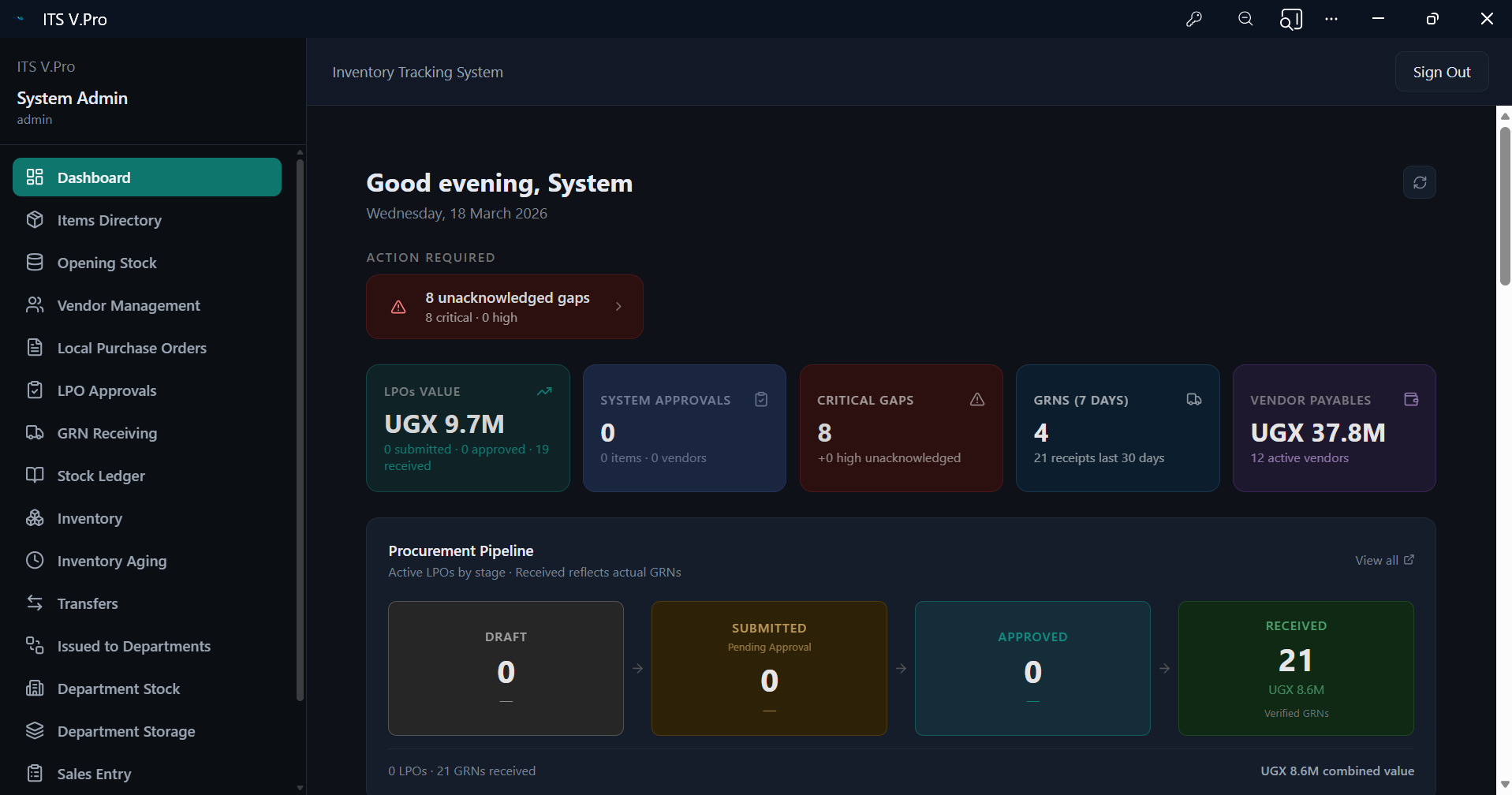
The master command surface — action items requiring attention, critical operational gaps, total LPO pipeline value, pending approvals, and live inventory alerts. Everything that needs a decision, visible in one unified view.
Review procurement, payables, receipts, stock positions and approval queues together.
Spot uninvoiced receipts, receiving issues, stock below PAR and operational gaps.
Follow approval queues and exceptions into the next action.
Eight control panels.
One unified command surface.
Each panel answers a practical question about your stock, purchases or supplier obligations.
Action Required
Review unacknowledged gaps and operational issues needing a decision.
Procurement Pipeline
See order counts, pipeline value and purchasing stages for the active cycle.
GRN Activity
Review receipts, supplier references, quantities and verification status.
Uninvoiced GRNs
Identify receipts awaiting supplier invoices and follow up before reconciliation.
Vendor Payables
See outstanding supplier balances and payment obligations.
Top Vendor Spend
Review your highest-spend suppliers and purchasing concentration.
Vendor QC Alerts
Follow up supplier shortfalls, condition issues and receiving discrepancies.
Inventory Alerts
Review low stock, PAR thresholds and items needing reorder attention.
Connect operational records to the next decision.
Use the command centre to review what needs attention now.
Built on three principles most inventory systems ignore.
Control, visibility and reporting work together throughout your operation.
Control — Not Just Recording
Approval gates, receiving checks and issuance controls help stock move with accountability.
Visibility at Every Level
See stock in the central store and each department, including movements and gaps.
Reporting That Drives Decisions
Turn stock movements, usage, aging and valuation into reports that support decisions.
Most businesses don't struggle because they lack transactions.
They struggle because they lack control.
Recording a transaction is only the start. Clear controls help explain movements and expose recurring gaps.
Bring traceability and accountability to your stock operation.
A backend mini-ERP with serious operational depth.
Connect procurement, vendors, receiving, inventory, departments, finance visibility and reporting.
Stock & Movement Control
Track balances, movements, returns and adjustments; review PAR and reorder needs.
Department Stock Visibility
See each department’s balances, issues and usage.
Procurement Discipline
Manage purchase requests and Local Purchase Orders with approvals.
Goods Receiving & Verification
Check deliveries against orders and invoices, and review differences.
Stock Counts
Compare physical and expected stock with recounts and approvals. Cycle counts remain planned.
Valuation & Aging
See inventory value, older holdings and slow-moving stock.
Reporting
Review stock, receiving, usage and operational exceptions.
Approvals & Accountability
Use role permissions, approval steps and recorded user activity.
Stock isn't one flat pool.
Your system shouldn't treat it like one.
Stock sits in stores, departments and work areas. Each location needs its own balance and accountability.
Review department balances, issuance history and usage trends against expectations.
Management sees every department's position in one place — without needing to chase reports or consolidate spreadsheets.
Stock Counts, Reimagined
for Real Control.
Run scheduled counts and targeted checks with variance review, sign-off and period continuity.
End of Week Counts
Weekly count cycles keep department and store balances under regular review.
End of Month Counts
Month-end counts support closing balances, variance review and documented approval.
Spot Counts
Check selected items or locations outside the regular count schedule.
Audit Counts
Use scoped count events, blind entries and approvals for formal review.
Departmental Counts
Count departmental stock with its own scope, closing record and accountability.
Store & Inventory Counts
Compare physical and expected stock in central stores and main inventory.
Cycle Counts
Planned rolling catalogue coverage to spread counting across the operating calendar.
Compare expected and physical stock, review differences, and carry approved closing balances into the next period where configured.
Not just counting.
Verifying, governing, and closing with confidence.
Compare expected stock from openings, receipts and movements with the physical count. Review discrepancies item by item.
Follow initiation, entry, variance review, recount, approval and period close in one documented process.
Finance and auditors get count-verified stock figures. Opening balances for each new period come from approved actual counts — not assumptions, not manual entries, not carry-forwards.
Built for businesses where
stock control is not optional.
Built around daily stock movements, departmental needs and management visibility. Confirm the fit for your workflow during evaluation.
Hospitality & Hotels
Connect stores, operating departments, issuances, receiving and reconciliation across a property.
Bars, Restaurants & Cafés
Track fast-moving food and beverage stock through receiving, movements and usage.
Multi-Outlet Operations
Agree separate stock pools, users and reporting for each location. Group-level consolidation needs separate validation.
Manufacturing & Production
Evaluate material visibility and movement controls for your production needs. Specialist production workflows require separate confirmation.
Warehousing & Distribution
Review receiving, transfers and issuances across storage locations. Validate volume requirements during evaluation.
Stock-Driven Businesses Generally
Bring stock, purchasing, departments and management reporting into a connected operating picture.
Who uses ITS V.Pro within these businesses
Relevant to teams responsible for stock, approvals, supplier balances and reporting.
Spreadsheets record. Generic apps approximate. ITS V.Pro controls.
Move beyond disconnected spreadsheets with controls that reflect your operation.
| Capability | ITS V.Pro | Spreadsheet | Generic App |
|---|---|---|---|
| Structured GRN receiving workflow | Partial | ||
| LPO creation & approval workflow | |||
| GRN verification against LPO + variance log | |||
| Department-level stock balances | Partial | ||
| Stock issuance to departments with refs | Partial | ||
| Department-to-department transfer control | |||
| Full movement history (opening → closing) | Partial | ||
| Leakage, waste & adjustment tracking | |||
| Stock count & reconciliation support | Partial | Partial | |
| Inventory valuation reports | Partial | Partial | |
| Inventory aging & slow-mover visibility | |||
| Role-based access control | Partial | ||
| Full audit trail with user & timestamp | Partial | ||
| Approval gates on critical transactions | |||
| Reorder level alerts | |||
| Department usage & performance reports | |||
| Multi-business / multi-outlet architecture | Partial | ||
| Built for hospitality & F&B operations | |||
| Advanced multi-type count framework (weekly/monthly/spot/audit) | |||
| Expected vs actual variance + approval workflow per count event | |||
| Blind count mode for independent count integrity | |||
| Approved closing stock seeds next-period opening balances |
Reports that answer questions.
Not reports that create more of them.
Turn daily records into stock, supplier and departmental visibility for management.
Stock Balance Reports
Review stock balances by item, category and department.
Movement & Transfer Reports
Trace issues, transfers, returns and adjustments behind a balance.
Department Usage Reports
Compare department usage against expectations and investigate unusual consumption.
Receiving & GRN Reports
Review receipts, suppliers, quantities and differences against orders.
Counts, Variances & Exceptions
Review count differences, unusual movements and receiving exceptions.
Valuation Reports
See inventory value by item, category and movement cost.
Aging & Slow-Mover Reports
Identify older and slow-moving stock using movement history.
Procurement Activity Reports
Follow orders, approvals, supplier activity and procurement bottlenecks.
See stock position, department performance and operational exceptions.
Use movement, valuation and reconciliation records for period-end review.
Follow receipts, orders, supplier discrepancies and reorder needs.
Stock is not just items on a shelf.
It is money your business is holding.
See what stock is worth, how it moves and where aging needs attention.
Stock Valuation
Understand the financial weight of your inventory
Review inventory value by item and category to understand financial exposure.
Inventory Aging
Spot slow-moving stock before it becomes a problem
Identify stock that is tying up money or space, and review older holdings before making new purchases.
Valuation and aging add a financial view to stock control.
Review aging and valuation alongside daily operational decisions.
When control matters, every action must leave a trace.
Role permissions, approval steps and recorded activity support accountability and investigation.
Role-Based Access Control
Assign permissions to roles so access reflects each person’s responsibilities.
Full Audit Trail
Review recorded receipts, approvals, issues and adjustments by user and time.
Controlled Approval Gates
Use approval and verification steps for purchasing, receiving and stock issuance.
Movement Traceability
Follow stock movements by reference, quantity, location and responsible user.
Variance Logging & Reconciliation Support
Review receiving discrepancies, count variances and adjustments during reconciliation.
Data Isolation Per Business
Plan separate business environments and access boundaries during implementation. Multi-entity oversight requires separate validation.
Make actions visible and reviewable.
Use transaction records to support investigation, reconciliation and management review.
A serious system must be
deep without feeling heavy.
As records grow, teams still need practical navigation and usable reports.
ITS V.Pro is being engineered for responsive navigation, efficient data access and practical daily workflows.
Move between stock, receiving, reports and departments with fewer steps.
Efficient queries and targeted loads are designed to support growing transaction histories.
Pagination, server-side processing and targeted rendering support responsive workflows.
Structured workflows are designed for teams working together. Validate concurrent-use requirements during evaluation.
Speed is not a luxury. In a live operation, a system that makes teams wait is a system that gets abandoned. ITS V.Pro is engineered to stay out of the way and in the flow.
Many systems stop at recordkeeping.
ITS V.Pro is built to control, understand, and act.
Operational workflows, accountability and useful reporting guide the design.
Follow stock through departments, stores, receiving and reconciliation.
Keep central stores and departments visible as separate stock responsibilities.
Build approval and verification into purchasing, receiving, issuance and counts.
Answer practical questions about movements, receipts, aging, value and variances.
Treat navigation, data loading and responsiveness as product requirements.
Evaluate the system against your daily operating pressure and transaction volumes.
Three levels of control. Pricing tailored to your operation.
Choose Core, Operations or Complete. Agree pricing around scope, users, locations, implementation and support.
Request a clear proposal based on your business needs.
Common questions about ITS V.Pro
Answers about access, fit, implementation and support.
See ITS V.Pro in action.
Book a demo focused on your stock, purchasing and finance workflows.